
How To Upgrade
There are two ways to upgrade CloudBasic server's processing power:
Option 1: Launch another instance and configure a Multi-AZ HA Cluster
(supported in version 7.16 and above and for EC2 instance type Large and above in version 7.nn, XLarge and above in version 8.nn ).
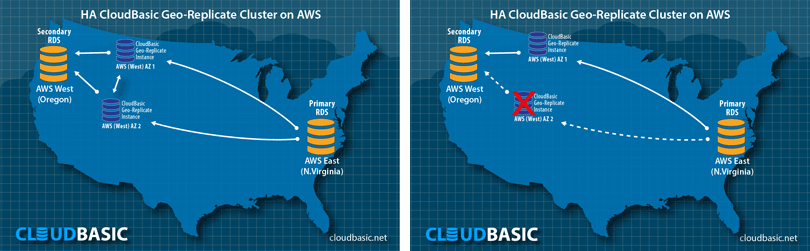
All it takes is to add the IP of the other server (got to AdvancedMulti-AZ HA Cluster). The cluster will load balance the replication processing and the workload of the previously ran as standalone server will be reduced by 50%. On top of this you will gain High Availability benefits. If one of the servers is down for maintenance or affected by an outage, the other one will pick up the processing.
Option 2: Upgrade to a larger instance type.
You do not have to boot up a new server from the AWS Marketplace. You need to:
2.1. Stop the server
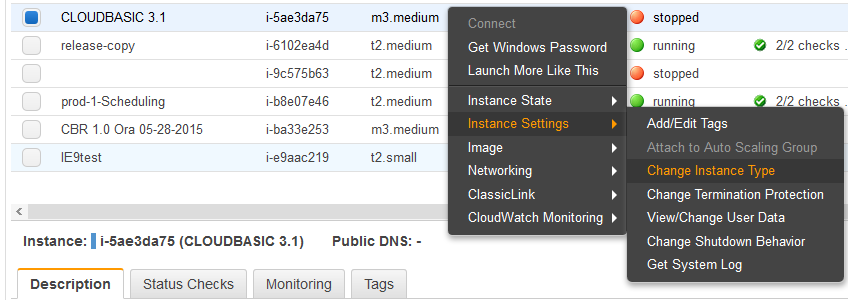
2.2. Right-click on the server > select "Instance Settings" > select "Change Instance Type"
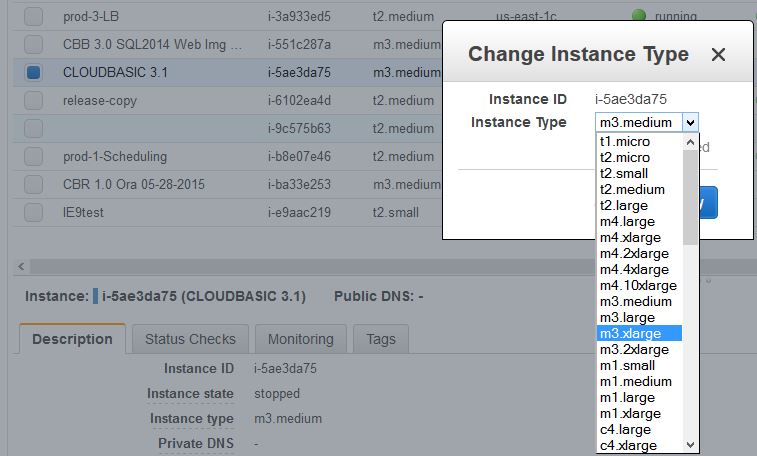
2.3. Select a larger instance type:
2.4. Boot up the server
All existing replications will continue to work.